Rocket League Beginner Guide: Control the Car, Then Read the Match
5 min read
Part of the beginner collection — explore all 10 guides ↗
MAKE IT YOUR READSaved
A grounded Rocket League routine for MENA players: camera comfort, useful touches, rotation, boost and a realistic first week.
Rocket League looks like football with cars, but your first opponent is often your own momentum. You see the ball, accelerate towards it and arrive too fast to do anything useful. Learning to slow down, turn and recover is not a preliminary chore: it is the foundation of almost every good play.
This guide is for standard Rocket League, not the mobile game Sideswipe. In the usual team modes, you are trying to put the ball in the other goal while keeping it out of yours. Your challenge is sharing space with teammates. Advanced aerial tricks can wait.
Make the camera and car understandable
Begin with the tutorial and a short Free Play session. Find acceleration, braking, steering, jump, boost, powerslide and the camera toggle in your controls. Use a comfortable layout and leave it stable long enough to learn it. Copying a professional's entire setup can replace one unfamiliar arrangement with another.
Practise driving a loop around the arena without touching the ball. Then approach the ball slowly and push it towards a chosen wall. Try switching camera views deliberately so you understand what each view helps you see. If you keep missing ordinary ground touches, reduce the exercise's speed before adding jumps.
Free Play includes ball-control tools, documented by Rocket League, that make repeatable situations easier to set up. You can also use training packs. Start with a simple exercise you can understand; finishing a difficult pack by accident teaches less than recognising why a basic contact worked.
Make the next touch useful
A touch should change the situation in your favour. Ask where the ball will go, where your teammate is and whether you can follow it. Hitting harder is not automatically better. Clearing into open space can relieve pressure; smashing the ball directly back to an opponent can simply restart their attack.
Try this original beginner drill: approach a stationary ball from three angles and attempt to send it to the same side of the arena. Do not measure only whether you made contact. Notice the direction created by your approach. Repeat at moderate speed, then add a little speed without abandoning control.
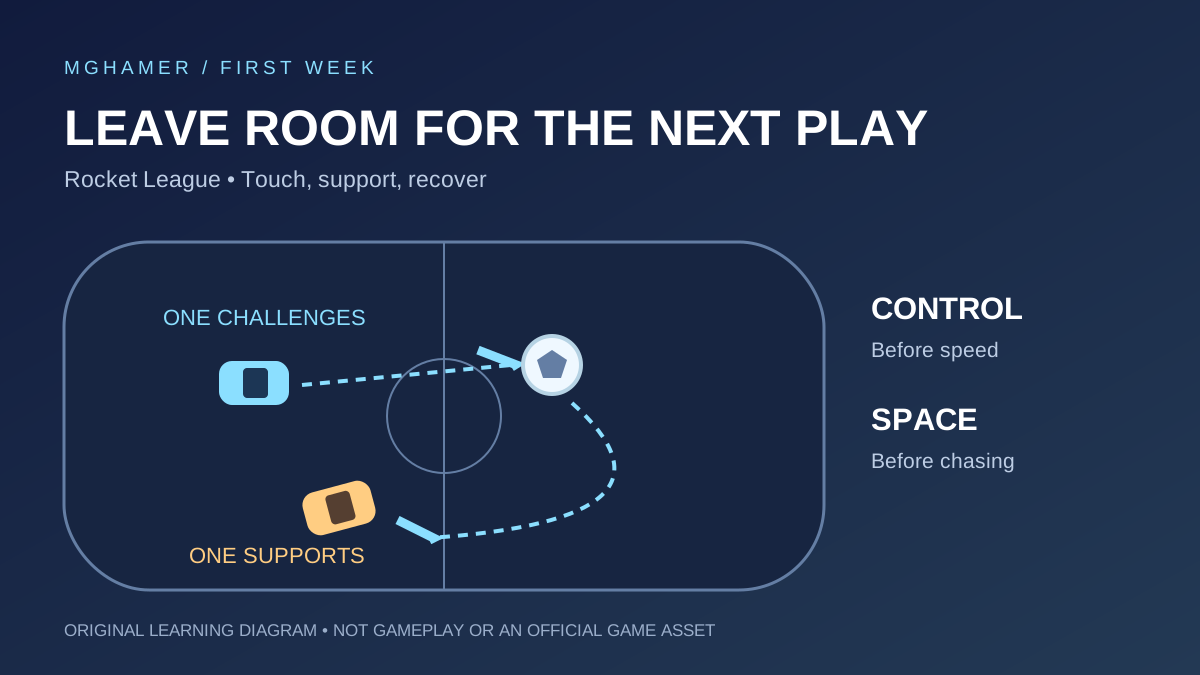
In matches, avoid treating every ball as your responsibility. If a teammate already has a clear approach, give them room and prepare for what happens next. Two cars charging the same touch can leave nobody able to defend the reply.
Rotate to support, not to disappear
After challenging for the ball, look for a route that returns you to a useful position without cutting through your teammate's approach. A simple starting habit is to move away from the immediate play and recover behind your teammate when your turn has ended. Rotation is a response to the situation, not a compulsory lap around the pitch.
On defence, try to arrive where you can see both the incoming ball and your goal. Resist driving across a teammate who is already making the save. When you are the last player between the attack and your net, staying available can be more valuable than attempting an unlikely interception.
Boost is a tool for reaching the next useful position. Do not abandon an immediate defensive responsibility just because a large pickup is tempting. Practise routes through smaller pads and spend boost with a purpose. The common mistake is not merely running out: it is spending the whole supply to arrive somewhere unhelpful.
Choose a region through evidence
Rocket League offers region selection, and its support page explains that the tournament schedule region is a separate setting. Check both when planning to play with friends. Do not assume changing one automatically solves the other.
For a MENA group, compare the available regions from each player's connection. Test during your actual shared playing hours, noting latency, instability and queue experience. A region that is comfortable for one member may be poor for another. Prefer a workable group compromise over declaring one server universally best for the entire Arab world.
Keep communication short and useful. Agree who will approach the kickoff and avoid repeating criticism after a mistake. If chat becomes distracting, adjust communication settings and return attention to the next play. A calm teammate who leaves space is easier to coordinate with than a skilled teammate who tries to do everything.
A seven-day route to dependable play
Day one: tutorial, controls and slow driving. Day two: practise directing ground touches. Day three: work on turning back towards your own goal after an attack. Day four: practise simple saves and finishing, choosing accessible training exercises rather than spectacular ones.
Day five: play with one friend and concentrate on avoiding simultaneous challenges. Day six: review a replay and identify two goals where positioning mattered before the final shot. Day seven: repeat your first drills and play several matches with one focus, such as recovering behind your teammate.
Track useful progress: fewer missed easy balls, fewer double commits and more controlled recoveries. Rank can move unpredictably over a small sample. Your immediate goal is to become readable and reliable; faster mechanics can grow on top of that foundation.
Sources & further reading
- Rocket League — Free Play controls and trainingrocketleague.com
- Epic Games Support — Rocket League region selectionepicgames.com
- Rocket League — Training packs for new driversrocketleague.com
What did you take away?
Real reactions. Thoughtful discussion. Every comment is reviewed before it appears.
Loading reader contributions…
Sign in to join the discussion